
This is an old revision of the document!
- dhcpcd
- Jonathan Haack
- Haack's Networking
- webmaster@haacksnetworking.org
Managing dhcpcd with ifupdown and Network Manager
Cockpit has advanced logging features for networking but it requires Network Manager. Additionally, Debian deprecated isc-dhcp-client and replaced it dhcpcd. Both of these changes require some tinkering in order to get them to lay off DNS, routes, and gateways. First, make sure that Network Manager is set to manage ifupdown with sudo nano /etc/NetworkManager/NetworkManager.conf:
[main]
plugins=ifupdown,keyfile

[ifupdown]
managed=true
Restart Network Manager sudo systemctl restart NetworkManager. Now, it's time to tell dhcpcd to cease running dns hooks when you restart networking.service. To do that, open up sudo nano /etc/dhcpcd.conf and comment out dns requests, disable tinkering with resolv.conf, and blacklist gateways on sensitive IoT bridges:
# comment out requesting dns stuffs from router
#option domain_name_servers, domain_name, domain_search

# stop it from messing with resolv.conf
nohook resolv.conf

# stop IoT bridges on vlans/subnets from creating gateways or routes
interface br2
    nogateway

# stop IoT bridges on vlans/subnets from creating gateways or routes
interface br3
    nogateway
You would think this would be enough! But no, Network Manager will still create interfaces for the physical NICs. Unless you edit them, they will request addresses on their untagged subnets. So, first, disable ipv4 and ipv6 on the ethernet interfaces in nm-connection-editor:
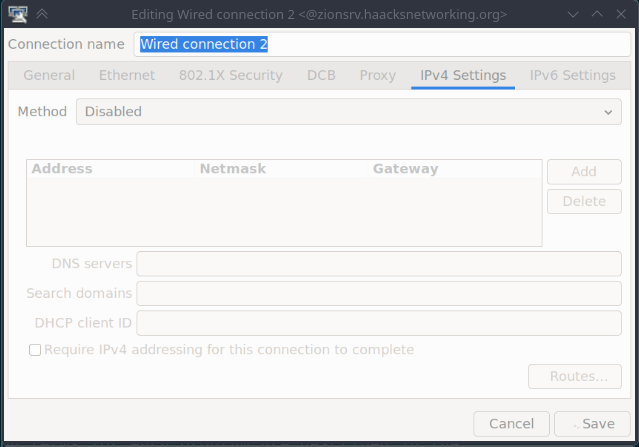
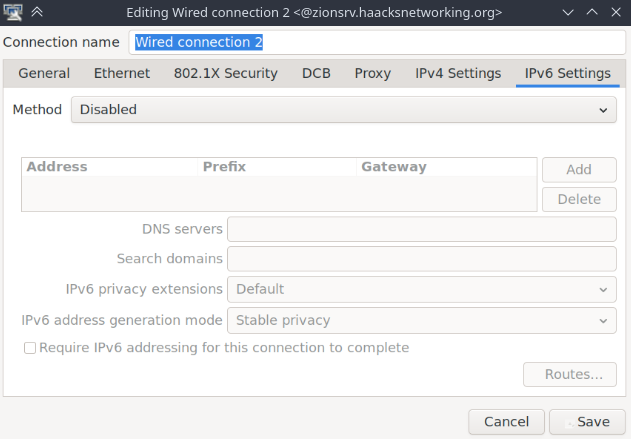
This stops the interfaces themselves from getting an IP from Network Manager. Do this for all the physical NICs. If you don't do this, then Network Manager will cause gateway issues by assigning these NICs a second IP on those subnets. We are done now, right? Not so fast … Network Manager will also, by default, pick up DNS via the bridges themselves! So, after all these changes, you need to open each bridge up and specify “address only” mode. Failing to do this will cause Network Manager to rewrite your DNS despite dhcpcd's configurations above. Here's what that looks like:
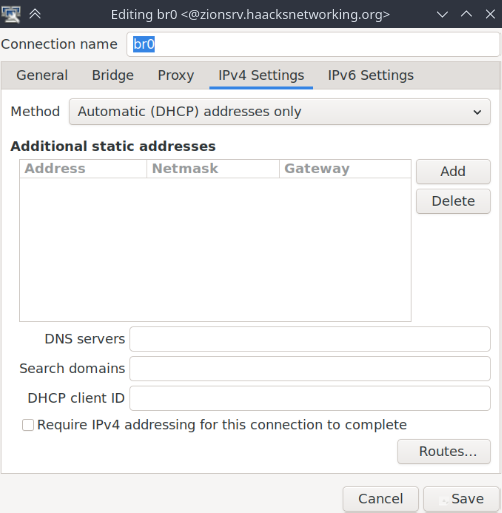
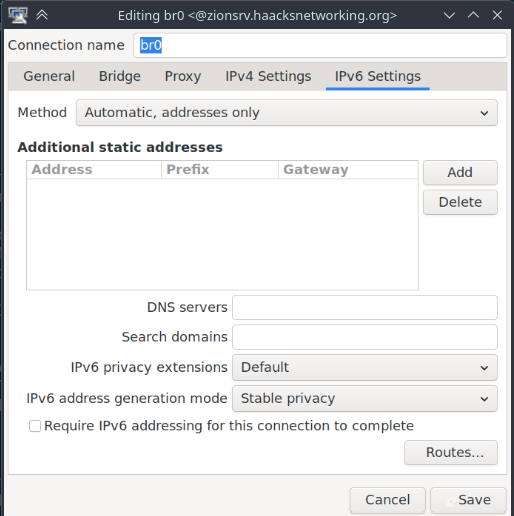
Okay, we are finally done. You can now safely run Network Manager alongside ifupdown and dhcpcd without having your DNS and gateways messed with. Make sure to check your routes and delete any rogue routes Network Manager created and/or that dhcpcd created:
ip route show default
This should show something like:
default via 172.50.50.1 dev br2 proto dhcp src 172.33.33.2 metric 1140
default via 172.18.18.1 dev br3 proto dhcp src 172.34.34.2 metric 1141
default via 10.18.18.1 dev br0 proto dhcp src 10.48.48.2 metric 1142
Not only did it create routes, it also screwed up priority. Now, if you want these routes, you can set priority in interfaces easily. Personally, I just want the bridges for vms/containers, but want the host to use the private network only. The vms/containers can still use the bridges and vlans/subnets they are connected to. So, for me, I deleted the rogue routes as follows:
ip route del default via 172.33.33.1 dev br2 #example
ip route del default via 172.34.34.1 dev br3 #example
After this, I restarted Network Manager, restarted networking and then made sure that everything remained the way I set it up.
sudo systemctl restart networking
sudo systemctl restart NetworkManager
ip route show default
default via 10.48.48.1 dev br0 proto dhcp src 10.18.18.2 metric 10
cat /etc/resolv.conf
nameserver 10.48.48.150
nameserver 10.48.48.160
nameserver fdf7:e8e6:a2dd:1:325f:5585:a42:8f9c
nameserver fdf7:e8e6:a2dd:1:4912:2cc9:8463:ff2c
You can now reboot, restart each service and DNS is not altered, nor is the gateway. This only took about a year to figure out. It was much easier in isc-dhcp-client; you just prepended your DNS and removed domain-name-servers from the request block and done. Until today, I ran isc-dhcp-client as a temporary solution to avoid figuring this out. Glad it's sorted. Now I can benefit from fully modern Network Manager and logging in Cockpit. Along with custom vnet names, this allows for granular monitoring of vm/container traffic. Additionally, by DNS being unaltered, I can ensure that my hosts stay on the private subnet/vlan and route all traffic through the designate pihole+unbound. And, the vms/containers can tap the bridges and route via the segregated vlans/subnets without issue. Likewise, you can use these same strategies to make sure you don't get sideways traffic on any dual-NIC/purposed IoT devices you have. If you don't do this, Network Manager and dhcpcd will just make DNS and route choices for you and traffic will go wherever based on however it decides to prioritize your router advertisements.
Updates
It is not enough to simply instruct dhcpcd to not set routes for the bridges, you also have to tell Network Manager the same. To do this, open nm-connection-editor and open the routes submenu in each bridge. Click both the options there for all the IoT or restricted bridges; leave the primary or private bridge untouched. Then, restart networking and NetworkManager and you should only see the default route for the private subnet/lan. Here is what that looks like:
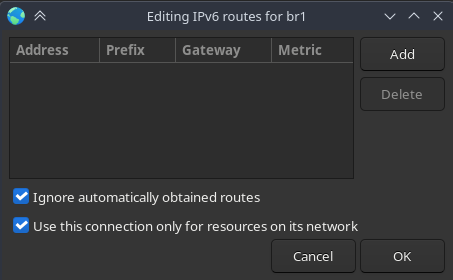
This worked flawlessly on two machines. However, one machine insisted on making routes no matter what I did. So, for that machine, I additionally stopped Network Manager from doing that using nmcli:
nmcli connection modify br1 ipv4.ignore-auto-routes yes ipv6.ignore-auto-routes yes
nmcli connection modify br2 ipv4.ignore-auto-routes yes ipv6.ignore-auto-routes yes
nmcli connection modify br3 ipv4.ignore-auto-routes yes ipv6.ignore-auto-routes yes
If you instead want the routes, but just don't want them to be default, then:
nmcli connection modify br1 ipv4.never-default yes ipv6.never-default yes
nmcli connection modify br2 ipv4.never-default yes ipv6.never-default yes
nmcli connection modify br3 ipv4.never-default yes ipv6.never-default yes
Just adapt this command to whatever your bridges are named. This final change took care of the most stubborn machine I had.
— oemb1905 2026/09/07 16:54


